
Fixtures and patching
What a fixture is in Spectralite, and how patching gives it a DMX address.
A fixture is any device Spectralite controls over DMX: a moving head, an LED bar, a par can, a strip of pixels. Two ideas hide behind that one word, and keeping them apart makes everything else clearer. There is the type of device, a reusable description of how that model of light behaves, and there is the specific unit sitting in your rig at a specific address. Spectralite models these as two separate things, and patching is the act of turning the first into the second.
Definitions and patched fixtures
A fixture definition is the reusable type. It describes one model of light without committing to where that light lives in your show. A definition comes from the built-in library, from a file you import, or from one you author yourself, and the same definition can be patched many times over: eight identical bars share one definition and differ only in address.
A definition holds one or more modes, where a mode is a selectable DMX personality: the channel layout the fixture uses in that operating mode. A basic RGB mode might occupy three channels; a full-feature mode of the same light might occupy twenty, adding pan, tilt, gobo, and finer color control. You pick the mode when you patch, and it must match the mode the physical fixture is set to, or the channels will not line up.
Inside a mode, Spectralite distinguishes two kinds of internal structure. A sub-fixture is a physically independent, separately positionable unit within one device: the eight strips of an eight-strip bar, each of which you want to place in space on its own. A pixel is a single addressable emitter point, the smallest thing the engine drives color onto. A single-cell par is one pixel; a matrix panel is a grid of them. Most library fixtures are one sub-fixture containing however many pixels the hardware exposes; genuine multi-part hardware is where sub-fixtures earn their place.
Each pixel carries emitter roles: the colored light sources the fixture actually mixes. Red, green, and blue are the familiar three, but real fixtures add white, amber, lime, warm and cool whites, and more. A definition imported with measured color data also records where each of those emitters sits as a real color, its primaries, which together bound the range of color the fixture can physically produce. You do not work with that data directly. The color engine reads it so that one authored color renders correctly onto each fixture's own emitters. That is covered in Color, and where the measured data comes from is covered in Importing GDTF.
A patched fixture is a definition placed into your project with an address. It references a definition, fixes a mode, and adds the two numbers that locate it on the wire: a universe and a start address. Patching a fixture, and re-patching it, is only ever a matter of setting those. The definition stays untouched and shared; the patched instance is what gets an address.
Placing a fixture in 3D space is a separate step from patching it. An address decides which channels a fixture listens to; a position map decides where it sits so effects can sweep across your rig by geometry. A fixture can be patched without being placed, and placed without being addressed.
Universes and the 512-channel structure
DMX carries lighting data in fixed blocks called universes. One universe is exactly 512 channels, and a channel is a single 8-bit value from 0 to 255. That ceiling is the reason universes exist at all: a rig with more than 512 channels of control simply uses more universes, each an independent block of 512.
Every channel a fixture uses lives in some universe at some position within that universe's 512 slots. A dimmer channel, a pan channel, a red channel: each is one slot. When you patch a fixture, you are choosing which run of consecutive slots, in which universe, this fixture will claim.
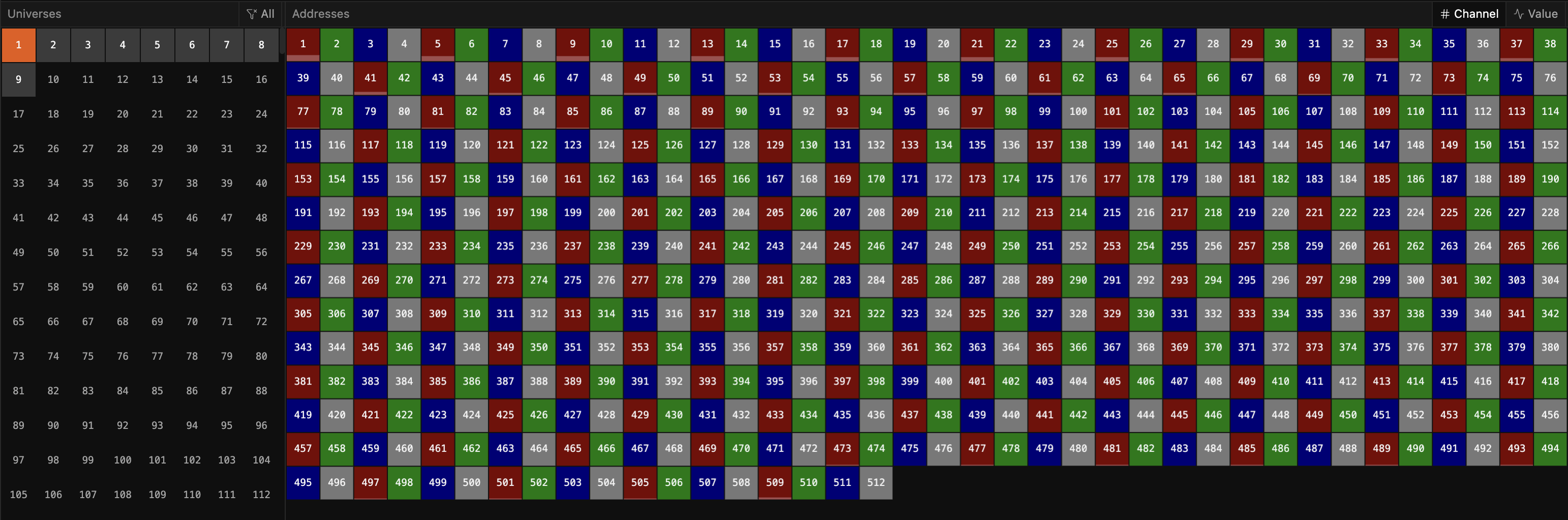
Spectralite supports a large number of universes, far more than any single show needs, so you are never rationing them. The practical limit is how many your output hardware and network can carry. Output covers how universes leave Spectralite and reach that hardware.
How a fixture occupies channels
A patched fixture claims a contiguous range of channels starting at its address. The length of that range is the mode's channel footprint: the total number of channels the mode uses, counting every emitter, dimmer, and movement channel it drives. An eight-channel mode patched at address 100 occupies channels 100 through 107. The next fixture has to start at 108 or later to avoid landing on top of it.
That footprint is a property of the mode. A mode with four pixels of RGB plus a master dimmer occupies thirteen channels. When you switch a patched fixture to a different mode, its footprint changes, and the range it claims changes with it.
If a mode's footprint runs past channel 512, the fixture continues into the next universe automatically. A fixture patched near the top of a universe can straddle the boundary and occupy the tail of one universe and the head of the next. You do not split it by hand; Spectralite lays out the channels across as many universes as the footprint needs.
The number you type versus the number on the wire
The universe and address you enter when patching are 1-based: universe 1 is the first universe, address 1 is the first channel. This matches what is printed on the fixture's display and in its manual, so the number you dial into the physical light is the number you type into Spectralite. On the wire the numbering differs by protocol, and Spectralite converts for you, so never pre-subtract: type the numbers exactly as the fixture shows them. How patch universes map onto the numbers Art-Net and sACN carry, and when a per-output offset matters, is covered in Output.
Aligning Spectralite's universes with a third-party receiver that numbers its own universes differently is a separate, per-output setting that leaves the patch alone. See Output.
Overlaps are flagged
Two fixtures must not share a channel. If they do, both write to the same slots and the result on stage is unpredictable, whichever fixture's data lands last is what the hardware sees. Spectralite does not stop you from patching into an occupied range; the engine sends whatever addresses you give it. What it does is show you the collision.
The Address Space panel maps every channel in every universe to the fixture occupying it, and highlights any cell claimed by more than one fixture as a conflict. Before a show, scan it. A clean address space is the fast confirmation that no two fixtures are fighting over the same channels.
An overlap is flagged, never blocked. Patching a fixture onto channels already in use silently overlaps them until you resolve it, so check the Address Space panel after any bulk re-patch.
Where fixture profiles come from
The channel layout a definition carries can come straight from the manufacturer. GDTF, the open interchange format for fixture profiles, packages a fixture's real DMX modes and, when the manufacturer measured them, its emitter chromaticities and response curves. Importing a GDTF profile gives you the exact channel map the maker published, plus the color data the engine uses to render accurately onto that fixture's emitters. The mechanics of importing, and what calibration data a profile can carry, are in Importing GDTF.
Related
Add a fixture
Bring a fixture definition into your project from the library or a file.
Patch a fixture
Set the universe, address, and mode for a fixture in your rig.
The Fixtures panel
Manage every patched fixture in the current project.
Color
Author one color and let the engine render it onto each fixture's real emitters.
Output
How universes leave Spectralite and reach your hardware.
Core concepts
The ideas the rest of the docs build on.