
Output
The last mile from a rendered color to DMX leaving the machine over Art-Net or sACN, plus the universe model that keeps your patch aligned on the wire.
Everything upstream in Spectralite exists to decide one thing: what value each fixture channel should hold this frame. Output is where that decision leaves the machine. The engine takes the color it solved for every fixture, packs each fixture's channels into DMX, and sends the result onto your network so real hardware can act on it. This page explains that last stage at a concept level. For the field-by-field walkthrough of the dialog, see the Outputs dialog reference.
A fixture is one controllable light with a block of DMX channels; if that term is new, read Fixtures first. The value each channel carries comes from the engine's color solve. Output does not change those values. It addresses them, wraps them in packets, and puts them on the wire.
Two ways to carry DMX over Ethernet
Spectralite sends DMX over the network using one of two standard protocols. There is no USB or serial DMX output; every path to your rig runs over Ethernet.
- Art-Net carries DMX in UDP packets on port 6454.
- sACN (the ANSI E1.31 standard, sometimes written Streaming ACN) carries DMX in UDP packets on port 5568, delivered by multicast.
Both move the same 512 channels per universe; they differ only in how they are addressed and delivered on the network. Pick the one your receiving hardware speaks. You can run more than one output at once, which is how a rig gets driven by two protocols in parallel, or how the same show feeds a primary and a backup path. Enabling or disabling an output is how you switch a rig between Art-Net and sACN.
For the fundamentals of DMX itself (what a channel is, how addresses stack), see Understanding DMX.
The universe model
A universe is a group of 512 DMX channels. Fixtures occupy a run of channels inside a universe, starting at their patch address; a rig larger than 512 channels spreads across several universes. The number that matters for output is which universe each fixture's channels land in, and what that universe is called once it leaves the machine.
Spectralite's patch sheet numbers universes starting at 1. The two protocols do not agree on where counting starts. Art-Net's first universe is 0; sACN's first universe is 1. Spectralite reconciles this for you: a freshly created output already carries the right setting for its protocol, so your patch universe 1 arrives where a standard receiver expects it, with no manual conversion.
The mapping a new output applies looks like this:
| Patch universe (what you see) | Art-Net universe on the wire | sACN universe on the wire |
|---|---|---|
| 1 | 0 | 1 |
| 2 | 1 | 2 |
| 3 | 2 | 3 |
The Art-Net column looks shifted because Art-Net counts from zero, so its universe 0 is the first one. That is the correct 1-to-1 result, and it needs no adjustment. sACN starts at 1 and reserves universe 0, so the sACN column lines up with the patch sheet directly. This is also why a new sACN output is preset differently from a new Art-Net output.
Universe Offset is for third-party alignment only
Each output has a Universe Offset field. It shifts every universe that output sends up or down by a fixed amount. A new output is already set to the value that makes the table above come out right, so most shows never touch it.
You change the offset for exactly one reason: a receiver on the other end numbers its universes differently from Spectralite's default and you need to line the two up. If a lighting node expects the data you patched as universe 1 to arrive labeled as Art-Net universe 5, you raise the offset so the whole output shifts to match. The offset moves the mapping; it does not change your patch.
Do not set an offset to convert between 1-based and 0-based numbering. Spectralite already does that conversion, correctly and per protocol. Adding an offset on top of it shifts every universe by an extra step and sends your data to the wrong place. Leave the offset at its default unless a specific receiver forces a different number.
When you edit the field, the dialog shows a live preview of where each universe will land and flags a mapping the protocol cannot carry. sACN, for example, has no universe 0, so an offset that would push a universe down to 0 is illegal and the editor tells you the value to use instead.
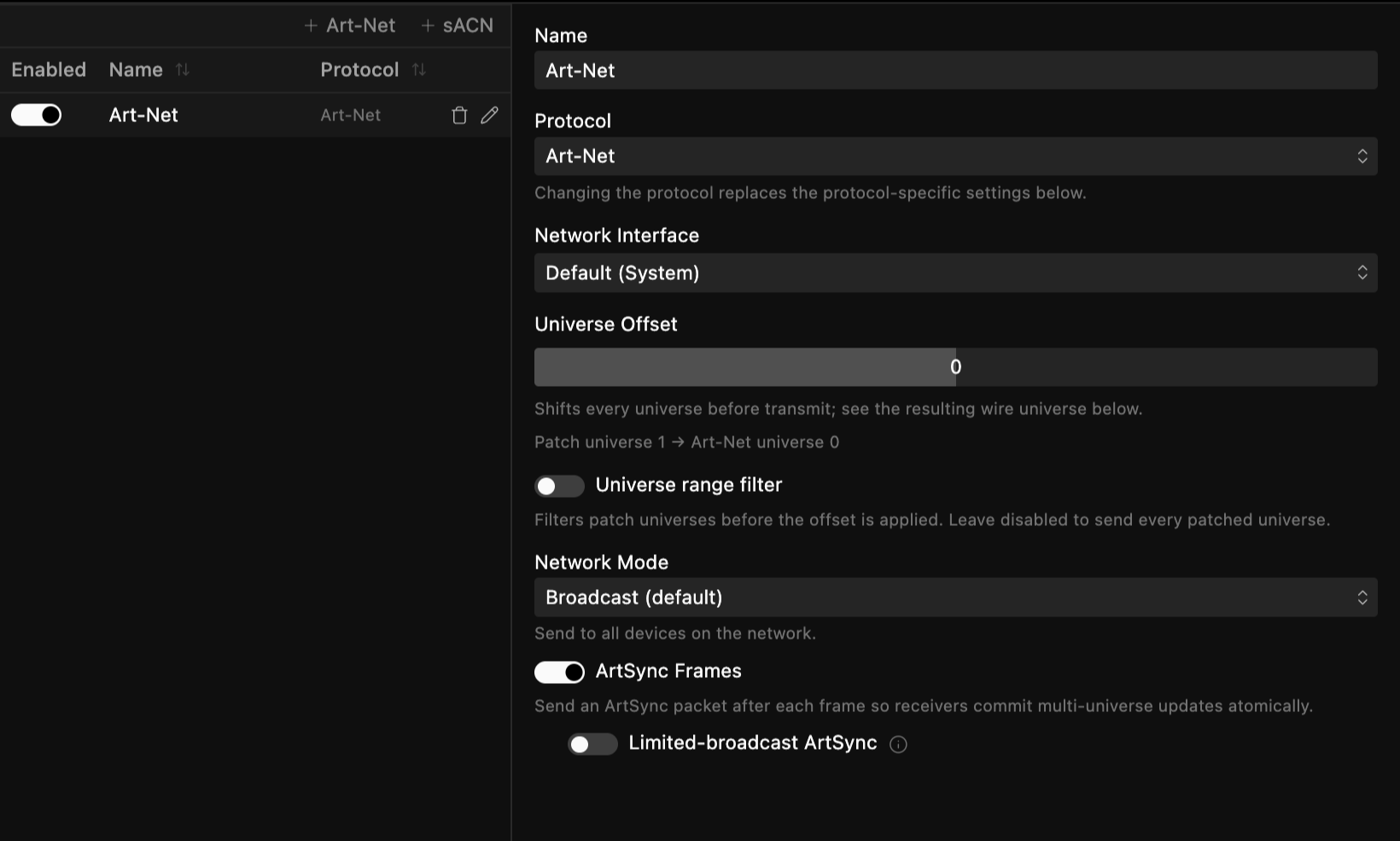
Broadcast, multicast, and unicast at a glance
How an output reaches the network changes what traffic your switches carry and which devices receive it. The default gets a rig running; the alternatives matter on larger or busier networks.

| Mode | Who receives it | When to use it |
|---|---|---|
| Unicast (Art-Net default) | Only the specific fixtures that need each universe | Busy or shared networks where flooding every device is wasteful |
| Broadcast (Art-Net) | Every device on the subnet, in one burst per frame | Small, dedicated lighting networks; no per-fixture addressing |
| Multicast (sACN, always) | Only devices that subscribed to each universe's group | sACN's normal delivery; receivers join the universes they use |
Two details change behavior in the field. In Art-Net Unicast, the destination address lives on each fixture. You set a target IP per fixture, and Spectralite sends each universe only to the fixtures that asked for it. A fixture with no target set receives nothing in unicast mode. In sACN, delivery is always multicast to a group derived from the universe number, so receivers subscribe to only the universes they care about.
Because sACN leans on multicast, a managed switch usually needs an IGMP querier for sACN packets to reach their destinations. On the sending machine, allow outbound UDP on port 6454 for Art-Net and 5568 for sACN through any firewall. The step-by-step network and receiver setup lives in Art-Net setup.
Where to go next
Outputs dialog
Every field on an output: protocol, network interface, offset, range, and mode.
Art-Net setup
Set up a network, choose broadcast or unicast, and get packets to real hardware.
Output and Networking
The full output and networking section, including troubleshooting.
Understanding DMX
Channels, universes, and addresses from the ground up.
Core Concepts
The whole signal flow, from fixtures to color to output.