
Color
Author one color; Spectralite renders it onto each fixture's real emitters and keeps it inside what that fixture can produce.
Spectralite treats a color as a request for light. You author it once, and for each fixture the engine works out how to make that light on the emitters the fixture actually has. An emitter is one of the colored elements a fixture mixes with: the red, green, and blue of a par, plus any white, amber, lime, or other channels a richer fixture carries. One authored color therefore reads as itself across a rig of mismatched lights. Put a warm amber on an RGB par, an RGBW wash, and a color-mixing mover at the same time, and all three show the amber you picked.
This page is the model behind that promise: the three ways to author a color, the one control that decides how a color is mixed when a fixture has emitters to spare, what happens when layers stack past what a fixture can put out, and how the engine keeps a color inside what each fixture can reach. The controls themselves are in the Color panel reference.
Three ways to author a color
Every color uses one of three modes, chosen with the xyY, Channels, and Temp tabs on the color. Two of them describe the light you want and let the engine work out each fixture's recipe. The third names the recipe yourself. A gradient uses one mode for all of its stops, and clicking a tab converts the whole gradient.
xyY
xyY is the portable color. Use it when a look has to hold across different fixtures. You pick a point on the CIE chromaticity diagram, the standard map of every color the eye can see. Its x and y coordinates fix the hue and saturation. Brightness sets how much of that color you want, as a percentage of the brightest the fixture can make it: at 100% a saturated red is the red emitter at full, and a white is the brightest white the fixture has. Because the point names a perceived color, the same xyY value drives an RGB par, an RGBW strip, and a CMY mover to the same visible result. New colors start in this mode.
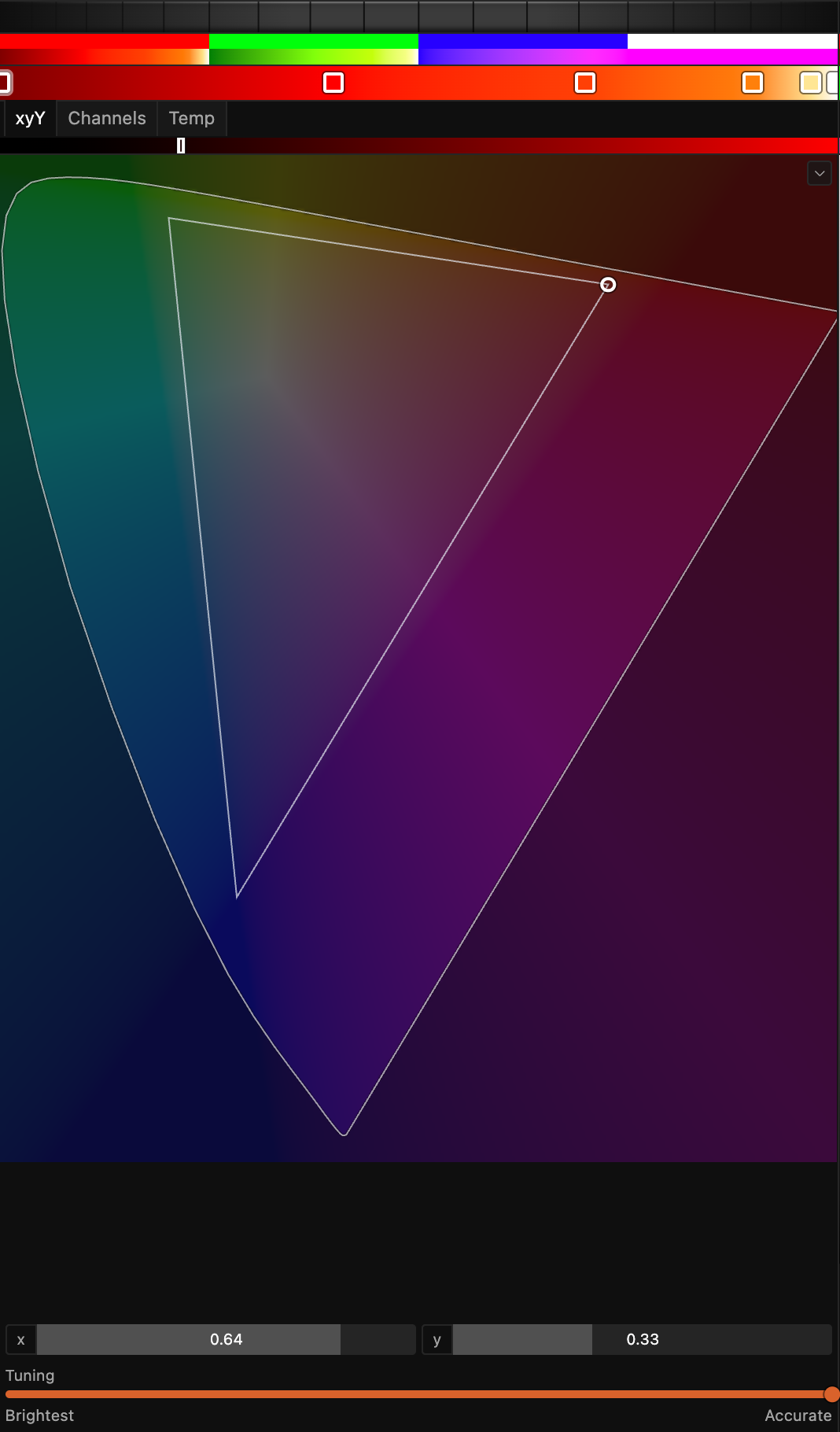
The chevron in the diagram's corner opens its display options: reference outlines for the Rec.709 (sRGB) and P3 gamuts, and a switch between the classic CIE 1931 diagram and the CIE 1976 version, which spaces colors more evenly. Both outlines are display gamuts, shown for orientation only.
Temp
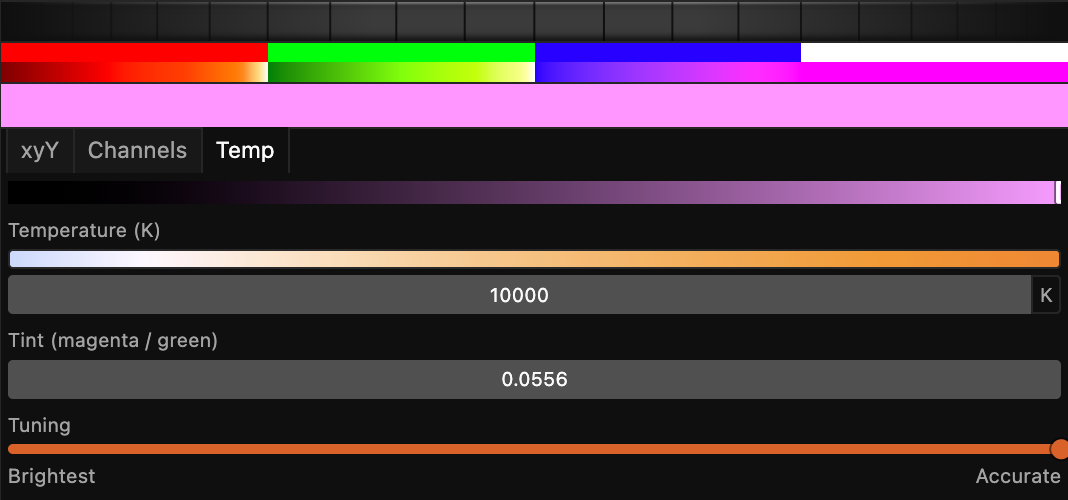
Temp authors white the way stage and film lighting always has: a color temperature in kelvin, from warm tungsten around 3200 K to cool daylight past 6000 K, plus a magenta-to-green tint for the small correction real white light usually needs. A temperature resolves to a point on the blackbody curve and from there behaves exactly like an xyY color, with the same Brightness and Tuning controls, so it travels across fixtures the same way. Reach for Temp whenever the look you want is a white.
Channels
Channels is the direct route. You set each emitter's level yourself, as a percentage of that emitter's full light output, and every fixture the color reaches drives the emitters it has at those levels. Twenty roles are on offer: red, green, blue, white, amber, UV, lime, cyan, magenta, yellow, warm white, neutral white, cool white, violet, indigo, mint, green-cyan, blue-cyan, blue-magenta, and pink. The grid shows the roles your patched fixtures have, and Window > Only Used Color Channels switches it to all twenty. A fixture without a role ignores that level. Channels suits an exact recipe, a single emitter on its own (UV alone, or a specific white), and work on one known fixture with nothing between you and it.
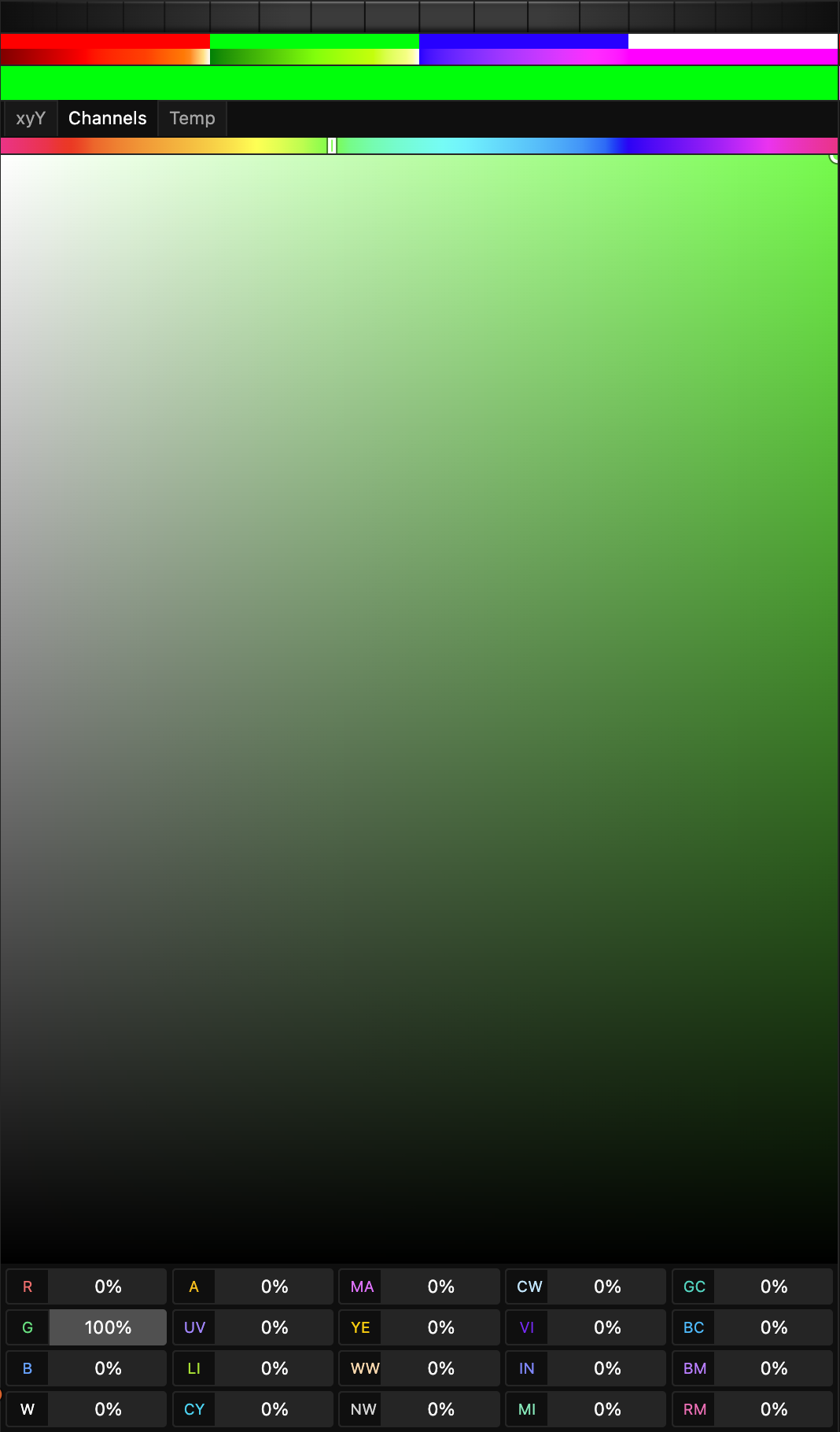
Two kinds of fixture need a portable color instead. A color-mixing mover with cyan, magenta, and yellow filters takes no Channels recipe at all; its filters and lamp move together only from an xyY or Temp color, and the patch says so when you hover the fixture's address. Where a fixture has a second, separate set of color emitters, a color drives only the first set, and the second set stays available as plain faders in the Parameters panel.
A Channels value names light. Spectralite works out the DMX level that produces that much light from the emitter, so on a fixture whose manufacturer measured how its emitters respond, the level sent differs from the percentage you typed. Four fixtures in the built-in library carry such measurements: the Ayrton Zonda 3 Wash in all of its modes, where a red at 50% sends DMX 147 because DMX 128 would light the red emitter to only 41.5%; the Briteq BTX-Skyran's warm white in 7 of its 8 modes; and the Prolights EclPanel TWC and TWC XL in most of theirs, where the difference stays within about 3% of output. Every other fixture in the library responds evenly across its range, so the light you name and the level it sends are the same number.
The Tuning control, from Brightest to Accurate
A fixture with only red, green, and blue emitters can reach a given color exactly one way. One that also carries a white or an amber can reach the same color several ways: lean on the white, blend the primaries, or something in between. All of those recipes look identical to the eye, which is what makes the choice free to expose as a control. Two different emitter mixes that produce the same visible color are called metamers, and this control chooses between them.
That control is the Tuning slider, and it runs from Brightest at one end to Accurate at the other. It applies to xyY and Temp colors, and one setting covers a whole gradient. Brightest favors the recipe with the most total output: every emitter that helps contributes, and the fixture puts out as much light as it can for that color. Accurate leans on the emitters closest to the target, so a white lands on a dedicated white emitter. Both ends produce the same color; what changes is which emitters make it, which affects how the beam renders surfaces and how it photographs. The trade is output. On a four-emitter head Accurate can cost about half the light at full, and on a six-emitter head more. Below that level both ends are equally bright. New colors default to Accurate.

On a plain three-emitter fixture the slider changes nothing, because such a fixture has only one recipe for any color. Hover such a fixture's address in the Address Space panel and a note says so. Tuning earns its keep on RGBW, RGBA, warm-and-cool-white units, and anything carrying lime, violet, or the rest.
Because the two ends are metamers of the same target, you can sit anywhere between them and still be on color. As a value sweeps from one Tuning setting to another, or as two layers with different settings mix, the color the audience sees stays put and only the way it is produced shifts underneath.
Stacking layers
Each layer in the stack asks for light, and Spectralite adds those requests up per fixture before it works out a single recipe. That order matters when the stack asks for more than a fixture can give.
xyY and Temp colors add as light. When their sum passes what a fixture can put out, the whole mix comes down together, and the fixture shows the hue the stack composed at a lower brightness. A bright mix keeps its color as you push more layers into it. The cost is peak brightness: a deep additive stack reads a little dimmer than it would if each emitter simply ran to its own ceiling. Adding a layer never makes an emitter dimmer than that layer alone would drive it. A white strobe over a red wash lights every emitter to at least what either layer asks.
Channels colors stack per emitter. Levels add, and each emitter stops at 100%. Three Channels layers of the same orange therefore stack to yellow, because red hits full while green keeps climbing, whereas three xyY layers of that orange stay orange. When a stack holds both kinds, each emitter receives the light share and the Channels share added together, capped at full.
In either mode, an override layer replaces what is below in proportion to its opacity.
Rendering across different fixtures
No two fixtures reproduce the same range of color. A fixture's reachable range, its gamut, is fixed by its real emitters: three primaries reach one triangle of colors, a fourth or fifth emitter widens it, and a fixture cannot produce a color outside that boundary. Spectralite builds each fixture's gamut from its actual primaries.
When an xyY or Temp color falls outside what a fixture can reach, the engine keeps the hue and reduces the saturation, pulling the color toward the fixture's own white until it lands on something the fixture can make. A deep saturated blue that one fixture can hit and another cannot renders on the second as its most saturated blue of the same hue, so a wash stays even across a stage of mismatched lights. Ask for a reachable color brighter than the fixture can go and it keeps its chromaticity and clips in brightness. Some fixtures have no saturation to give up: a tunable white with two emitters reaches only a line of colors, and a single-color fixture reaches one point. The patch reports those cases, so you can see why a color lands where it does.
Channels colors skip the solve as long as they reach the fixture directly. Each emitter puts out the share of its light you asked for.
Route one through a mixing node and that stops being true. Mix Color and Add Color have to combine a Channels color with something described the portable way, and the only thing the two have in common is the color they make, so the Channels side is converted to a described color first. That conversion loses three things. Two different emitter mixes that make the same color become the same color, and you cannot get the original mix back. The engine picks the brightness for that color, and the brightness your levels implied is lost. And only red, green, blue, white, and amber take part in the conversion; UV, lime, the extra whites, violet, mint, and the rest are dropped. If you want a Channels recipe to arrive exactly as authored, keep it out of a mix.
UV is one of those dropped roles for a further reason: a portable color describes visible light, and UV has no visible color to describe. An xyY or Temp color never touches a UV channel. To drive UV, author a Channels color that names it, and keep that color out of any mix.
On a color-mixing mover with cyan, magenta, and yellow filters, the color's chromaticity positions the filters and its Brightness drives the lamp, so a Brightness of 0 fades the head to black.
Gradients
Each preset color is a gradient, so an effect can sweep across a run of colors. Between two stops, Spectralite blends in the color space set under Edit > Renderer Settings; Renderer Settings lists the choices. The default, Oklch, keeps a fade saturated: a red-to-blue gradient passes through purple. Both linear RGB spaces blend the light itself, which is what two real lights crossfading do, and that fade dims through grey in the middle. A Temp gradient between two whites sweeps in even steps of warmth whatever the space. One Tuning setting covers all of a gradient's stops.
Calibration and fixture profiles
This section is for readers who want to know what feeds the solve. You can author color all day without it. The short version: when a fixture's profile carries the manufacturer's measured color data, Spectralite solves against those real numbers, and it tracks how much data it has and how good it is.
A fixture profile can come from a GDTF file, the standard exchange format for fixture definitions (see importing GDTF). Beyond the channel layout, a GDTF file can carry measured colorimetric data for each emitter: its exact chromaticity (the precise x and y of that fixture's real red), its relative brightness against the fixture's brightest emitter, and a response curve describing how the emitter's output tracks its control level. When that data is present, the solver builds its picture of the fixture from the measured numbers, so the color it targets is computed against the emitters this fixture really has. A measured response curve also corrects each emitter's dimming behavior, so a level lands where the manufacturer measured it to land. That correction reaches Channels colors as well, which is how the four measured fixtures listed under Channels land a Channels percentage at the light it names. When a profile ships no measured data, Spectralite falls back to sensible defaults drawn from a large survey of real fixtures, so an uncalibrated fixture still renders reasonably.
Spectralite tracks where each piece of color data came from and how trustworthy it is. For every emitter it records the provenance of the chromaticity: whether the profile named that emitter directly (the strongest binding), whether it was matched by its color, or whether no usable data was found and a default was substituted. It also classifies each profile into a data-quality tier, from a profile with real measured chromaticities down to one that declares color mixing but carries no emitter data at all. Because real GDTF files in the wild sometimes carry placeholder, transposed, or physically impossible chromaticities, Spectralite validates every emitter's color against the visible spectrum: a coordinate that lands outside the range of real light is pulled back onto the boundary of what the eye can see before it ever reaches the solve, and the correction is recorded.
Where the data itself is doubtful, the patch says so. A file that rates one emitter brighter than the whole fixture, claims every emitter is equally bright against its own measurements, names a white its emitters cannot mix, or carries no measured color at all marks the fixture as needing attention in the Address Space panel, with a sentence saying what to do.
Spectralite consumes the fixture manufacturer's measured profile data. "Calibration" here means honoring those declared measurements and tracking their provenance and quality; measuring your own physical units and entering corrections stays outside the app. Spectralite also stops short of spectral rendering. The subtractive mixing used for CMY fixtures is a color-space approximation of how their filters combine, exact at the extremes and a smooth estimate between them. That is accurate enough to hold a CMY mover on color alongside your LED fixtures, which is the job it was built for. Where the data is thinner or the physics is approximated, the engine says so.
Preset colors and the color library
The Color panel authors three project-wide preset colors, the primary, secondary, and tertiary, that effects reference throughout a show. Edit one there and every effect using it updates at once, so you can restyle a whole show from one place.
The swatches above each preset color are the color library, Spectralite's equivalent of a gel swatch book: named, familiar colors you can pick from and apply, the same physical anchor a filter number gives on a traditional rig. Click a swatch to apply it, or open the full set to browse, import, and manage libraries. See the Library Manager for organizing them, and the color nodes for referencing preset colors inside an effect.
Related
- Core Concepts: where color sits in the full signal flow.
- Effects and layers: the stack whose layers this page adds up.
- Output: how resolved color leaves the machine as DMX.
- Color panel: author preset colors and gradients.
- Renderer Settings: the gradient color space.
- Address Space: where a fixture's color limits are reported.
- Importing GDTF: where measured fixture profiles come from.
- Color nodes: reference preset colors inside an effect.
- Library Manager: manage color libraries and swatches.