
Connect Your Lights
Connect Spectralite to real fixtures by adding an Art-Net or sACN output to a DMX node, then verify and troubleshoot the connection.
Spectralite sends DMX over Art-Net or sACN, the two standard protocols for carrying DMX across Ethernet. To reach real fixtures you need a DMX-over-IP node on the same network subnet as your computer, wired over Ethernet, or fixtures with a built-in Art-Net or sACN receiver.
Set up an output
Art-Net output is enabled by default, so a node on the same network is often all it takes. To add or change an output, open Edit > Outputs.
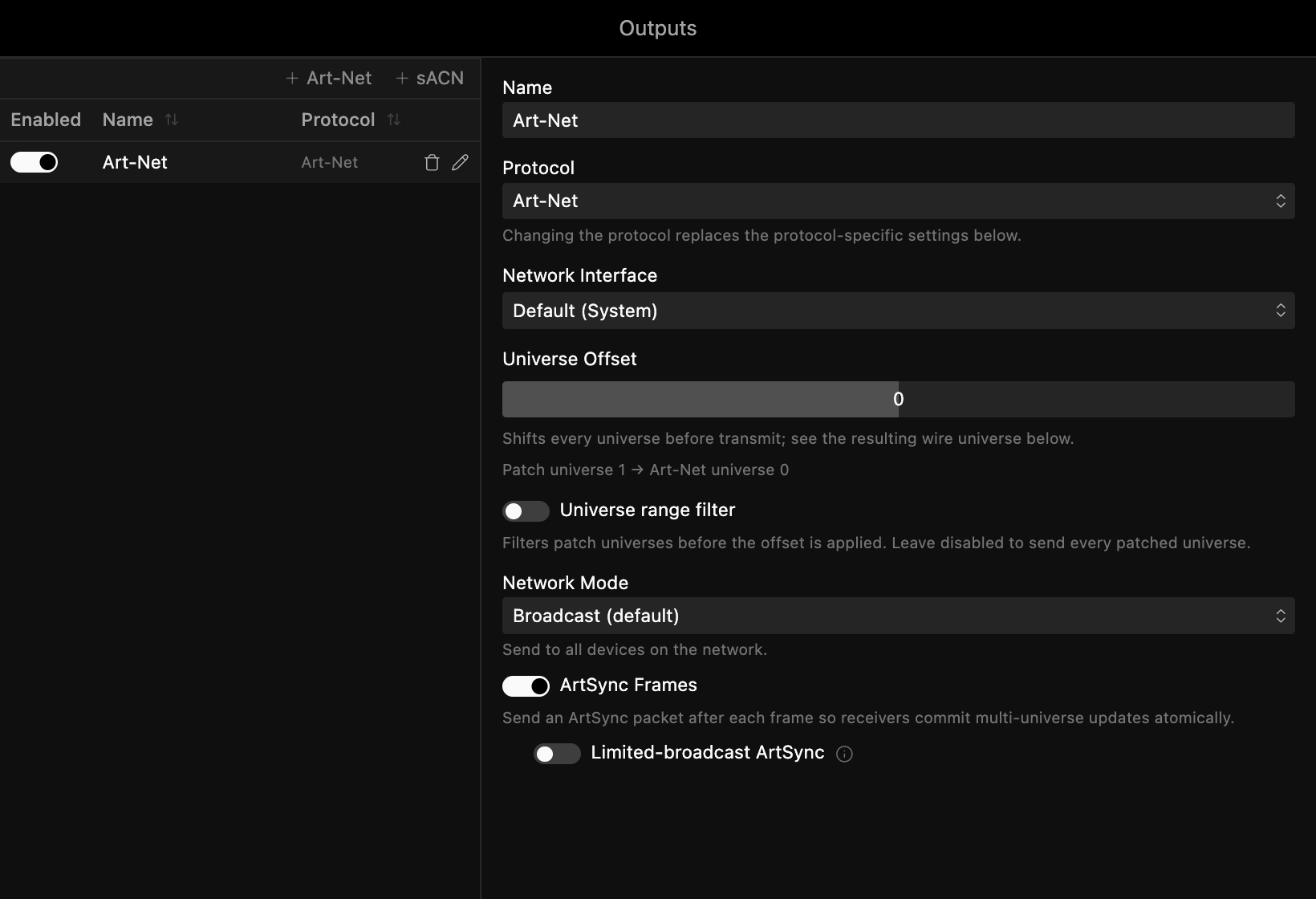
Click Art-Net or sACN at the top of the list to add an output of that protocol, then configure it on the right:
- Network Interface picks the network card that reaches your lights.
- Universe Offset shifts which wire universe each patch universe transmits on, to match a third-party receiver that expects different numbering. Spectralite nodes need no offset.
- Universe range filter limits output to a subset of universes. Leave it off to send every patched universe.
- Network Mode is Unicast by default, which sends each universe to the Target IP set on its fixtures. Switch to Broadcast to reach every device on the subnet without per-fixture addressing.
- ArtSync Frames (Art-Net only) tells receivers to commit multi-universe frames at once. Leave it on.
Outputs save per project, inside the .slp file.
Verify the connection
- Patch a fixture at the right universe and DMX address.
- Add an effect layer and raise its opacity.
- The fixture should respond.
If a fixture stays dark, check its master dimmer in the Parameters panel. Many moving heads default their dimmer to 0.
Troubleshooting
Fixtures not responding? Work through these:
- Confirm the fixture's DMX address matches the one set in Spectralite.
- Check that the universe numbers match between Spectralite and the node. The patch panel, the node's Start Universe, and the Controllers Uni column all use the same 1-based universe number, so they line up directly. Spectralite converts to the correct Art-Net (0-based) or sACN (1-based) wire universe for you; a Universe Offset is only for aligning with third-party gear.
- Verify both devices sit on the same subnet, for example 192.168.1.x.
- For Art-Net, allow UDP port 6454 through the firewall. For sACN, confirm the network permits multicast.
Explore the Interface
A tour of Spectralite's workspaces, the preset panel layouts along the top of the window that group panels for each part of building a show.
Set Up MIDI Control
Wire a MIDI controller's knobs, faders, and buttons to Spectralite actions using the MIDI Input dialog, so it can drive a live performance.